
By Hoist DigiSoft Data Team · Last updated 2026-11-07
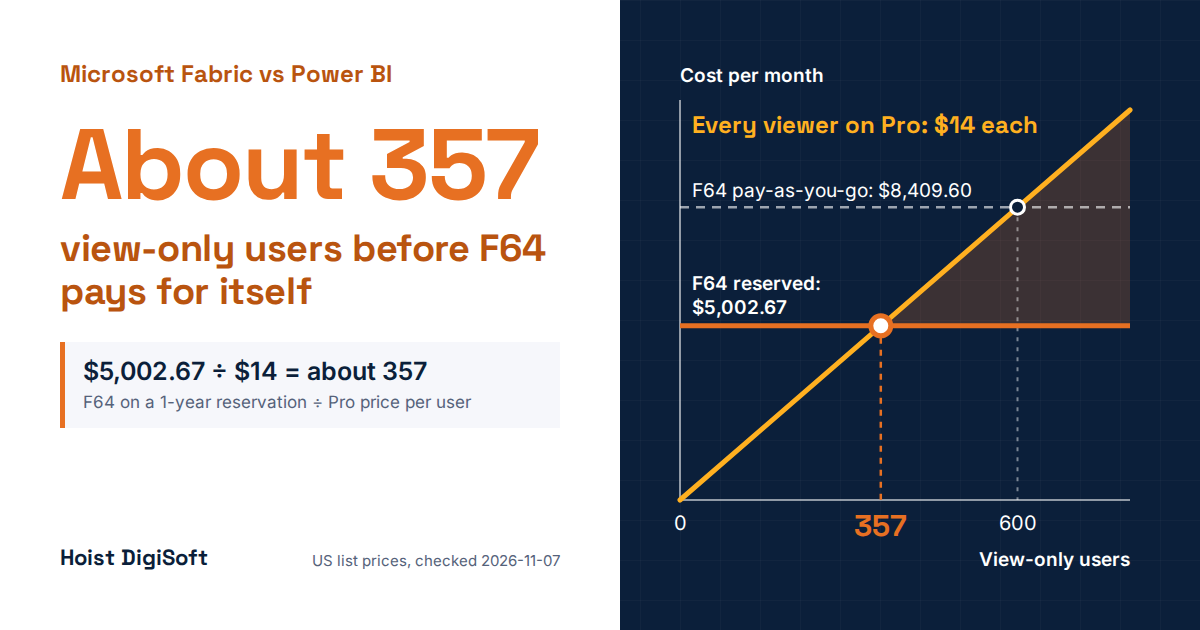
Power BI is the reporting tool; Microsoft Fabric is the wider data platform that includes it. Most mid-sized teams shouldn’t move reporting to Fabric yet: below F64, every viewer still needs a paid license, and F64 only pays for itself at roughly 357 view-only users. Move when you need a warehouse and pipelines there, or when viewer numbers justify it.
Licensing and prices checked 2026-11-07. Dollar figures are US list prices (Fabric: East US region). Prices differ by country and Azure region, so teams in Canada and Australia should rerun the math in the Azure pricing calculator.
What Is Microsoft Fabric vs Power BI, in Plain Terms?
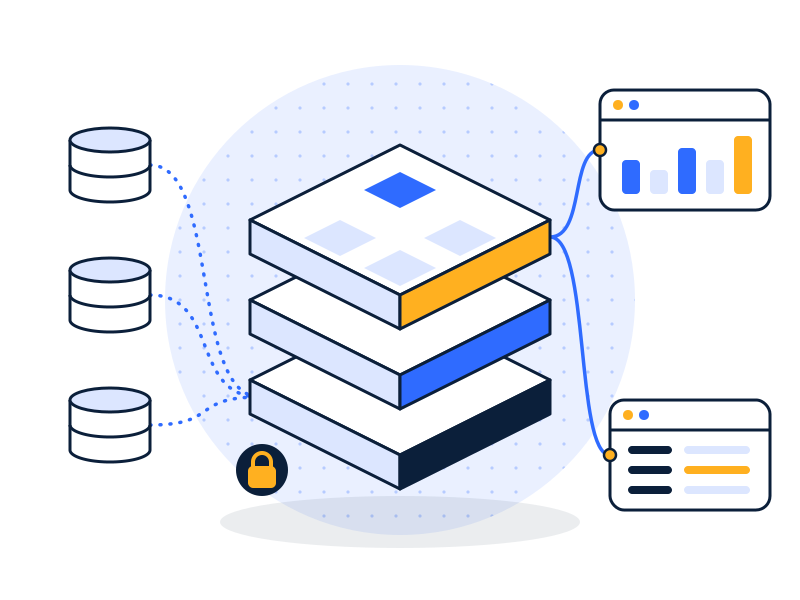
Power BI builds and shares reports. Fabric adds lakehouses, warehouses, pipelines and notebooks on a shared pool of compute called a capacity, with Power BI as one workload. Power BI is still sold on its own too: Microsoft describes it as available both standalone and integrated with Fabric, and Pro and Premium Per User (PPU) are not being retired.
So nobody has to pick one over the other. The real decision is whether to buy a capacity and put your reports on it.
| Power BI Pro | Power BI PPU | Fabric capacity (F SKU) | |
|---|---|---|---|
| Pricing | $14 per user/month | $24 per user/month | F2 $156.33, F8 $625.33, F32 $2,501.33, F64 $5,002.67 per month on a 1-year reservation; about 68% more on pay-as-you-go |
| Max Model Size | 1 GB | 100 GB | 3 GB on F2–F8, 25 GB on F64 |
| Who Can View | Pro or PPU users | PPU users only | Below F64, Pro or PPU users; F64 and up, free users with a viewer role |
| Warehouses, Pipelines, Notebooks | No | No | Yes |
| Compute To Monitor | No | No | Yes |
What Do the Top Comparisons Say, and What Do They Leave Out?
We read the comparison guides our search turned up for this keyword. They agree on the basics: Fabric doesn’t replace Power BI, Power BI suits reporting on data that’s already clean, Fabric suits engineering-heavy work, and many companies will use both. All of that is correct.
Three caveats, though. Several of these guides come from firms selling Fabric services or training, which is fine as long as you know it. Prices go stale: one guide, last modified in November 2024, still lists Pro at $10. And few do the arithmetic. One says Fabric gets more economical with “a large population of view-only consumers” without naming a number; one names about 350 users, which is right at today’s $14, but runs its worked examples at the old $10 price.
Most also skip the parts that decide the answer for a smaller team: small capacities don’t remove licenses, small capacities have lower model limits than PPU, new capacities can bill overage by default, Copilot no longer requires moving your reports, and the best-known ROI study describes a far larger company. The rest of this post covers each one.
Microsoft Fabric vs Power BI Pro: When Does Capacity Save You Money?
Only at F64 and above, and only if you have enough view-only users.
Below F64, viewers still need Pro or PPU. An F32 costs $2,501.33 a month and every viewer still pays for a license, so nothing is saved. At any size, people who create or edit content in shared workspaces also keep their Pro or PPU license.
The Break-Even Formula: F64 monthly price ÷ Pro price = view-only users needed. On a reservation, $5,002.67 ÷ $14 is about 357. On pay-as-you-go, $8,409.60 ÷ $14 is about 600.
The headcounts below are illustrative, not clients. They assume everyone would otherwise need Pro, and they exclude storage and overage. Costs are our arithmetic on Microsoft list prices.
| Report users (creators + viewers) | All Pro, per month | F2 plus all Pro | F64 reserved plus Pro for creators |
|---|---|---|---|
| 40 (5 + 35) | $560 | $716.33 | $5,072.67 |
| 150 (10 + 140) | $2,100 | $2,256.33 | $5,142.67 |
| 400 (20 + 380) | $5,600 | $5,756.33 | $5,282.67 |
| 800 (30 + 770) | $11,200 | $11,356.33 | $5,422.67 |
At 150 users, F64 costs about 2.4 times the Pro bill. At 800, it costs about half. That saving is why larger organizations have a good reason to move.
Check What You Already Own: some Microsoft 365 plans include Power BI Pro. Those seats cost nothing extra today, so F64 saves you nothing on them and your break-even moves further away.
Why Can a Smaller Fabric Capacity Be a Step Down for Power BI?
Many teams look at Fabric because a model has outgrown Pro’s 1 GB limit. Small capacities are an odd fix for that. F2, F4 and F8 cap a model at 3 GB, F16 at 5 GB, F32 at 10 GB and F64 at 25 GB. Matching PPU’s 100 GB takes an F256, which is $20,010.67 a month reserved. These are upper bounds on any tier, and a refresh can more than double a model’s memory use.
PPU has its own catch: everyone who views the content needs PPU as well. Thirty PPU users cost $720 a month. The line against F64 sits near 208 users on list prices, and Microsoft’s documentation says PPU is more cost-effective below 250.
What Operational Work Comes With a Fabric Capacity?
Pro and PPU don’t ask you to manage memory or CPU. A capacity does, because its workloads draw on one pool.
Bursting and smoothing absorb short spikes well, and that’s a strength of the design. If a capacity stays overloaded, though, the documented steps are:
- past 10 minutes of future capacity used, new interactive operations wait 20 seconds;
- past 60 minutes, new interactive operations are rejected;
- past 24 hours, all new requests are rejected until the usage is paid off.
Interactive operations include people opening reports. If your pipelines and your executive dashboards share a capacity, someone needs to own the Capacity Metrics app and know what to do when it shows throttling. For a team with one analyst, that’s a new part of the job.
Two billing details to check:
- Overage Is On By Default: new capacities have overage enabled with a 25% rolling 24-hour threshold, billed at three times the pay-as-you-go rate. On an F8, that’s 48 CU-hours at $0.54, or about $26 per rolling 24 hours, and Microsoft warns that charges can exceed the threshold. There’s no standing charge and it holds off throttling, so it may be the right setting. Just choose it on purpose.
- Pausing Has Limits: pausing saves pay-as-you-go money, but it can make content unavailable. It suits a dev capacity better than one serving reports every day.
Does the Forrester 379% ROI Apply to a Mid-Sized Company?
Not directly. The 379% is a risk-adjusted, three-year ROI for a modeled company, not a measured result at any one firm. Microsoft commissioned the study, published in May 2024. Forrester interviewed four people at companies with $1 billion to $34 billion in revenue and built a composite organization with 10,000 employees and $5 billion in revenue. That composite includes 40 data engineers and 400 business analysts. Forrester itself makes no assumption about the return other organizations would get.
This doesn’t make Fabric a weak product. Microsoft reported more than 31,000 customers, a run rate above $2 billion and 60% revenue growth in January 2026. But those numbers tell you it’s selling. They don’t tell you it will pay back for a company with two analysts.
We also have to be straight about our own evidence. We found no independent public data on Fabric outcomes at mid-sized companies. “Most mid-sized teams” is our judgment, based on the licensing math and Microsoft’s own documentation, not a survey result.
Do You Need to Move to Fabric to Use Copilot in Power BI?
You need a paid capacity somewhere, but your reports don’t have to move. Copilot in Power BI requires F2 or larger, or P1 or larger. A Fabric Copilot capacity bills a group of users’ Copilot activity to one designated capacity, and those users can work in Pro and PPU workspaces and in Power BI Desktop.
That turns “we want Copilot” into a much smaller decision: a small capacity for the Copilot bill, with reports left where they are. Size it from real usage, since F2 is only the minimum.
When Should a Mid-Sized Team Move to Fabric?
“Wait” has clear exceptions. Move, or at least price it seriously, if any of these is true:
- You’re On A P SKU: the choice is already made. P SKUs retire at the end of your current agreement term and migration isn’t automatic, so plan it now. P1 maps to F64.
- You Have Roughly 360+ View-Only Users On Paid Seats: check that F64 can carry your load, then run the formula above.
- You’re Building A Warehouse Anyway: this is the biggest exception. If you’re a Microsoft shop with no data warehouse yet, Fabric belongs on the shortlist next to the options on our data warehouse consulting page. Judge it as a warehouse decision, and budget Pro for viewers if you land below F64.
- You Need Streaming Or Data Science On The Same Data: these workloads don’t exist in Pro or PPU, so per-user licenses can’t cover them.
- You Embed Reports For Customers: with app-owns-data embedding, any F SKU works and end users don’t need licenses. Internal viewers follow different rules.
Stay on Pro or PPU if reporting is the actual need, you have fewer than a few hundred readers, your warehouse already exists, and nobody is available to watch capacity.
One popular reason to move doesn’t hold up on its own. Vendor guides list inconsistent reporting or disputed numbers as a sign you need Fabric. New infrastructure doesn’t decide how gross margin is defined or who owns that definition. Agree on metric definitions first, then fix the data underneath. You may need a platform afterward, but you’ll know why.
How Do You Test Fabric Without Committing?
- Count Your Users: creators, viewers, and seats already included in Microsoft 365.
- Measure Your Largest Model: include refresh memory, then compare it to the limits above.
- Use The Trial For Features, Not Sizing: the trial runs 60 days on F4 or F64 and is meant for evaluation, not production. It excludes Copilot, and when it ends, non-Power BI items stop working unless you reassign them to paid capacity within seven days. A pilot that runs well at 64 capacity units tells you little about F8.
- Size On Pay-As-You-Go: F SKUs bill per second with no commitment. Run real workloads on the size you’d buy, and read the Capacity Metrics app.
- Reserve Last: the reservation saves about 41%, but only buy it once you know the size.
A disclosure, since you should weigh our view accordingly: we sell Power BI consulting and we also work with Fabric, so either answer can become paid work. The formula above is here so you can check it yourself. If you’re comparing advisers, our guide to choosing a Power BI consultant applies to us too.
FAQs
Does Microsoft Fabric Replace Power BI?
No. Power BI is a workload inside Fabric and is also still sold on its own. Power BI Pro and Premium Per User remain active licenses. What Microsoft is retiring is Power BI Premium per-capacity (P SKUs), which are replaced by Fabric F SKUs at the end of each customer’s agreement term.
Microsoft Fabric vs Power BI Premium: What Changes?
“Power BI Premium” covers two licenses. Per-capacity P SKUs are retiring at the end of each agreement term, and Fabric F SKUs replace them, with P1 mapping to F64. Premium Per User is separate and stays active, but it doesn’t provision a Fabric capacity, so it can’t run warehouses, pipelines or notebooks.
Do Viewers Need a License on Microsoft Fabric?
It depends on capacity size. On F2 through F32, every viewer needs Power BI Pro or Premium Per User. On F64 and larger, users with a free license and a viewer role on the workspace can view Power BI content. People who create or edit content in shared workspaces need Pro or PPU at any size.
How Many Users Justify F64?
On US list prices checked in November 2026, about 357 view-only users on a 1-year reservation, or about 600 on pay-as-you-go, assuming each would otherwise need a $14 Pro license. Seats already included in your Microsoft 365 plan push the number higher. Confirm the workload also fits on F64.
Is Fabric Worth It for a Small Company?
Usually not for reporting alone, because capacities below F64 add cost without removing Pro licenses. It can be worth it if you need a warehouse and pipelines and prefer one Microsoft platform. Small capacities start low, so compare Fabric with other warehouse options on total cost, skills and fit.
Do We Have to Rebuild Reports to Move to Fabric?
Generally no. Workspaces are assigned to a capacity rather than rebuilt. Microsoft says that in a same-region move from a P SKU to an F SKU, semantic models and refresh schedules carry over and standard Power BI items see no downtime, apart from active refreshes. Check model size limits first, especially when moving from PPU.
Prices and limits in this post come from Microsoft’s Power BI pricing page and Microsoft Learn: Fabric licenses and capacity, checked 7 November 2026.
Not sure which side of the line you’re on? Book a free 30-min data audit · Fix my Power BI